LobbyGod Connection Issues and Lag: What Call of Duty Players Should Know
Gaming connection problems can be particularly frustrating when you have added a service specifically to improve your Call of Duty matchmaking experience. If you are using LobbyGod and suddenly notice higher ping, unstable latency, packet loss or inconsistent matches, it is worth looking at the entire network path rather than immediately blaming your broadband connection.
LobbyGod is positioned somewhat differently from a conventional full-tunnel VPN. Depending on the configuration being used, services of this type may focus on matchmaking traffic, DNS settings or selective routing rather than sending absolutely everything through one traditional VPN tunnel.
That distinction can reduce the amount of traffic being redirected, but it does not mean every user will experience identical performance.
Why Can Matchmaking Routing Introduce Lag?
Any time traffic is redirected, the path between your device and online services can change.
Sometimes that is beneficial. Your ISP may normally use a congested or inefficient route, while an alternative path can improve latency.
The opposite can also happen.
If traffic is sent through a location that is further away, overloaded or poorly connected to the game network, your ping can rise. You might also experience greater jitter, where latency constantly moves up and down rather than remaining stable.
For a competitive shooter such as Call of Duty, consistency is often as important as the headline ping number.
A stable 55 ms connection can feel considerably better than one that fluctuates between 30 ms and 100 ms.
Test LobbyGod Against Your Normal Connection
The easiest troubleshooting method is comparison.
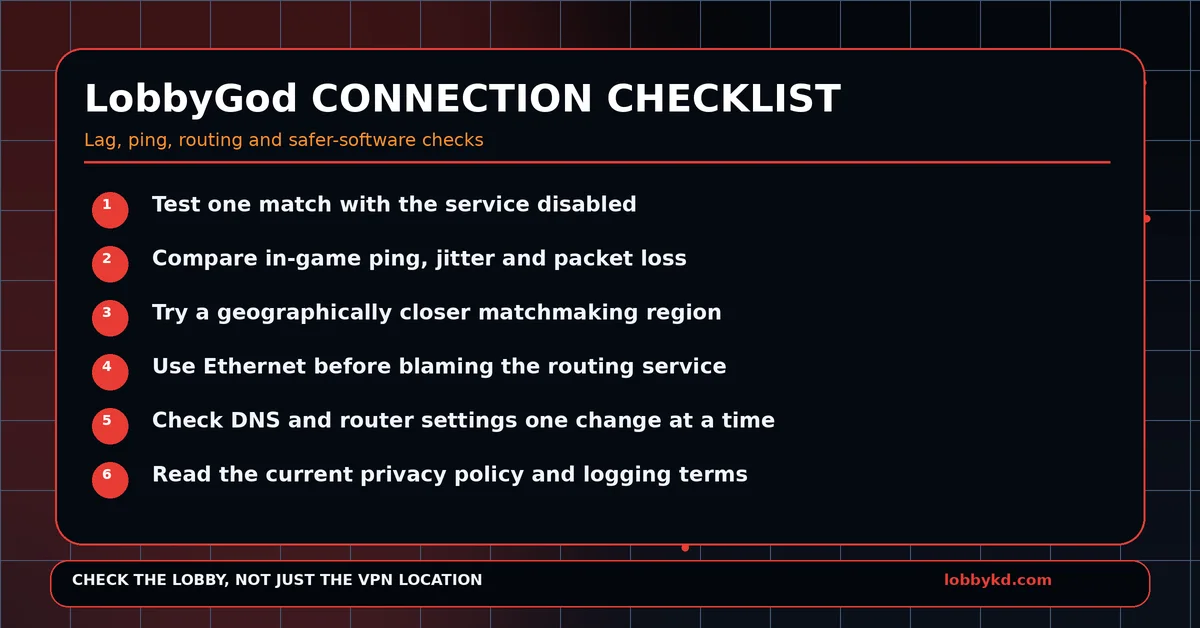
Disable LobbyGod and play several matches using your normal internet connection. Note your average in-game latency and watch for packet-loss or packet-burst warnings.
Then enable your LobbyGod configuration again and test under similar conditions.
If the problem only appears with the altered configuration, try a geographically closer matchmaking location before changing anything else.
Avoid simultaneously changing DNS servers, router settings, Wi-Fi channels and several other variables. If you change everything at once, you will have no idea which adjustment actually solved the problem.
Using Ethernet is also worthwhile. Wi-Fi congestion can easily produce symptoms that look like VPN or routing problems.
Be Careful With Networking Software
LobbyGod itself may not require every user to install a conventional Windows VPN application, but the wider Call of Duty VPN market includes many downloadable programs.
Any EXE capable of changing network adapters, routing tables, DNS settings or firewall rules deserves careful treatment.
Always download software directly from the provider you intend to use.
Do not install unofficial “modified,” “cracked” or mirrored clients from random websites, file hosts, Discord servers or forum links.
Check the Windows publisher information when available and keep Microsoft Defender and SmartScreen enabled.
A warning does not automatically prove that an application is malicious, particularly with newer software that has little reputation data, but unfamiliar network software should still be verified before installation.
VPN Privacy Is Also Worth Considering
Using a VPN or routing service creates a relationship of trust with whoever operates that infrastructure.
That does not mean LobbyGod or any particular gaming VPN is harvesting your personal data.
However, VPN providers can potentially see certain connection information or metadata depending on how the service is designed. Users should therefore read privacy policies rather than assuming that every service labelled “VPN” automatically provides complete anonymity.
Look at what information is collected, how long it is retained and whether it is shared with service providers or third parties.
Is Changing Region Really the Best Way to Find Easier Lobbies?
This is the bigger question.
Changing matchmaking regions is still an indirect method of finding an easier lobby.
Even if a particular location has worked well before, you do not actually know the difficulty of the next lobby until matchmaking places you into it.
That is why LobbyKD offers a different approach.
Instead of assuming that a particular region must contain easier players, LobbyKD focuses on estimating the K/D difficulty of the actual lobby you received.
If you still want to use a specialist Call of Duty VPN, consider established options such as SBMMOFF VPN or NoLagVPN and compare their performance on your own connection.
But if your real objective is simply identifying easier lobbies, knowing the lobby score directly can be considerably more useful than repeatedly switching locations and hoping.
0 Comments
No approved comments yet.
Sign in to react or comment.
Login